
Every evening I sit down on the couch, look at the TV stand, and there it is: a router and a modem, blinking green and orange, with a nest of cords behind them. I want to hide router and modem without losing my Wi-Fi. But the cable comes into my living room, so the boxes have to live there, and last winter I shoved them in a closed cabinet and my Wi-Fi bars dropped in the bedroom. If your living room looks anything like this, you know the trade: neat or connected, pick one. Here is how to hide router and modem without losing signal.
I wanted fixes that make the boxes disappear without hurting the signal. Below I cover why the router is always in the middle of the room, three free things to try first, and three picks that solve three different problems: hiding the boxes, disguising them, and calming the lights. I chose them by size, airflow, whether you need to drill, and what real buyers say about them, using the listing details.
Why the Router and Modem Are Always Out
The internet cable usually comes through one spot on the wall, and that spot is often behind the TV or beside the couch. Your modem has to be there, and your router needs open air and a central place to reach every room. So the ugly boxes end up on the most visible shelf you own.
In my apartment the real annoyance is small and nightly. I turn off the lamp, and the little blue and green lights throw dots across the ceiling. Then I tuck the cords behind the stand and the whole pile still looks like a science project.
Free Fixes: How to Hide Router and Modem Before You Buy Anything
These three fixes cost nothing, and I would try each one before looking at a single product.
Hide it behind something that is not metal
I move my router behind a big basket or a tall plant, but never a closed box, and I leave air around all sides. Wood, fabric and plants let the signal through much better than metal does. Then I check my phone’s Wi-Fi bars in the bedroom, so I know it still works.
Stand books or a frame in front, and cover the brightest light
I line up a few books I already own in front of the router and leave the top and back open. If one light is too bright at night, I put a small piece of tape over it. It looks tidier in about five minutes and it costs me nothing.
Ask about one box instead of two, and move it higher
I call my internet company and ask if they have a combo modem and router, which is one box in place of two. If I can, I also put it up on a shelf instead of the floor, because a higher spot usually gives a better signal. I would never tuck it in a cabinet with the door shut.
Once the boxes are hidden, I like to style the spot around them. My shelf decor ideas show how I dress up a shelf so a router fits in, and the desk organizers for working from home help when the router sits near your desk. For the rest of the room, I put together living room inspo ideas too.
When the Free Fixes Are Not Enough
Those habits helped, but I still wanted the boxes to look like decor and the lights to stop glowing at midnight. If your cords are the real mess, I wrote about cable management solutions, which handles the cord side of this. This post is about the router and modem boxes themselves.
Here is the easier way. These three products each fix a different part of the problem: one hides the boxes behind a vented front, one lifts them onto the wall in a wooden box, and one calms the lights. Check the size of your own router and modem before you click anything.

Quick Comparison: 3 Ways to Hide a Router and Modem
| Product | Best For | Key Feature | Amazon |
|---|---|---|---|
| Homode Wood WiFi Box Hider Router Shelf (16 x 12.2 x 10.5 in, Rustic Brown) | A messy TV stand or desk | Vented sliding front with a cable hole | Buy On Amazon |
| BEARUT Wooden Router Shelf Wall Mount WiFi Router Storage Box (14.9 x 9.8 x 5.4 in, Retro) | A wall by an outlet or desk | Wall mount box, cable holes | Buy On Amazon |
| FLANCCI LED Light Dimming Stickers (2 Sheets) | Blinking lights at night | Peel-and-stick sheets you cut to size | Buy On Amazon |
New for 2026: Fresh Ways To Hide A Router And Modem
My router blinks at me from the shelf every night, and I would love to stop seeing the tangle of cords. These three only showed up on Amazon this season, so they sit apart from the picks below. I would use each one a little differently, depending on where the modem has to live in my room.
Hide It In A Clean White Box
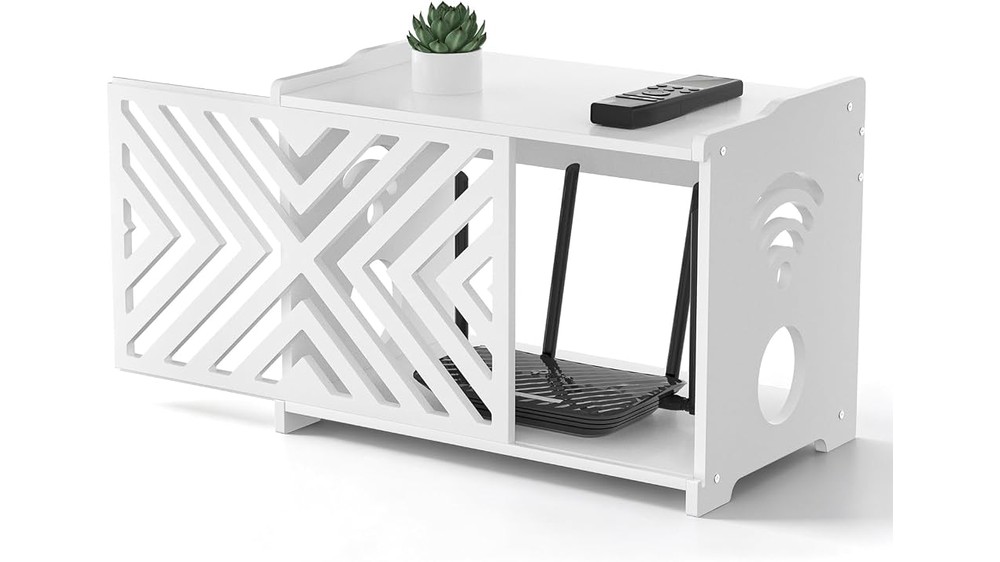
I want my cords out of sight, but I do not want to paint or drill anything.
This Decorative WiFi Router Box Hider and Projector Shelf is a simple white box with a shelf on top, so I would drop the router inside and set a small plant above it. The room looks calm and I would not think about cables when I sit on the couch.
Lift It Off The Floor And Onto The Wall
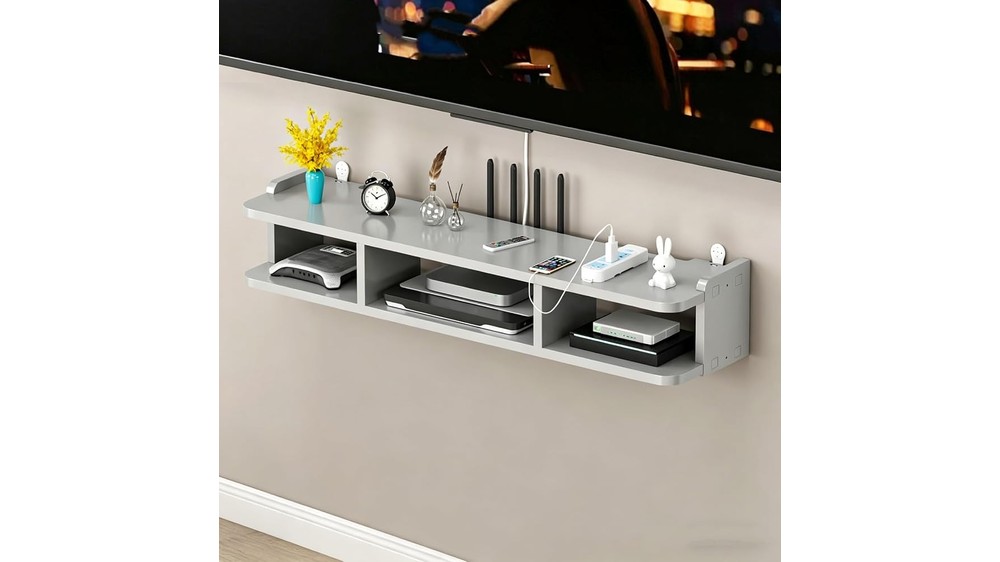
My floor is already full, and the modem always ends up near the vacuum and the dust.
This Wall Mounted WiFi Router Shelf, Floating Wooden Organizer floats on the wall, so I would get the router up high and out of the way. I would pick it for a small room, since it takes zero floor space and still holds a few cords tidy.
Give It A Tall Cabinet With Air Vents
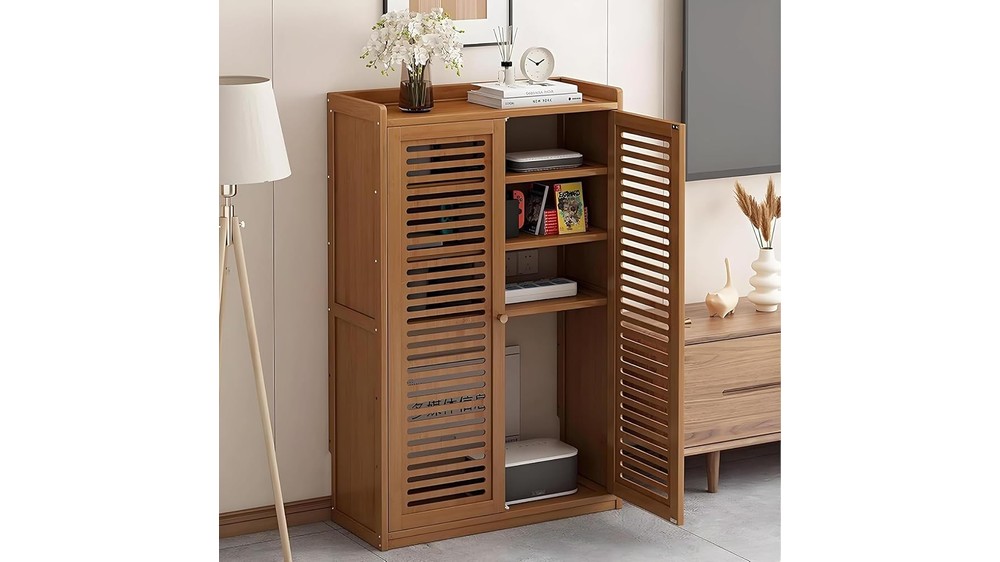
I worry that a closed box will make my router hot, and then the signal drops.
This Floor Standing WiFi Router Storage Cabinet with Wood Grill stands on the floor and has a grill front, so air can pass through while the blinking lights stay hidden. I would put it in a corner where it looks like a real piece of furniture.
1. Homode Wood WiFi Box Hider Router Shelf (16 x 12.2 x 10.5 in, Rustic Brown)

This is a small wooden cabinet with a black slatted front that slides open. The router and modem sit inside, the cords run out through a round hole in the side, and the top is flat for a remote or a small plant. It is the answer when the TV stand looks like a tangle and you want one clean box instead.
Main Features
- Size: The listing says 16 inches wide, 12.2 inches tall and 10.5 inches deep.
- Material: Wood with a black metal front panel, per listing.
- Airflow: Ventilation cutouts for cooling, and the listing says it is designed to avoid blocking the Wi-Fi signal.
- Access: A detachable, sliding front panel so you can reach the devices, per listing.
- Setup: You assemble it yourself with the included instructions. It stands on a shelf, so no drilling is needed.
What Customers Like
- Amazon shows 4.7 out of 5 stars on the listing.
- Customers commonly appreciate that it goes together easily and looks nice.
- Several buyers say their router and modem fit inside without trouble, and one says it hides the cords and a UPS battery too.
- Some buyers mention it keeps a router away from a curious puppy.
Things to Consider
- Measure your gear first. One buyer says it came out smaller than they expected, and a couple of buyers call it pricey.
- One buyer could not replace a damaged screw head, though they say the seller gave them a credit.
- One buyer hung theirs on the wall, which would mean drilling and is not something the listing promises.
- Any enclosure can cut the signal a little, so keep the vents clear and test your Wi-Fi after you set it up.
Best Suited For
- Router and modem on a TV stand, desk or shelf
- Anyone who wants a no-drilling option
- Homes with pets or kids who tug at cords
2. BEARUT Wooden Router Shelf Wall Mount WiFi Router Storage Box (14.9 x 9.8 x 5.4 in, Retro)
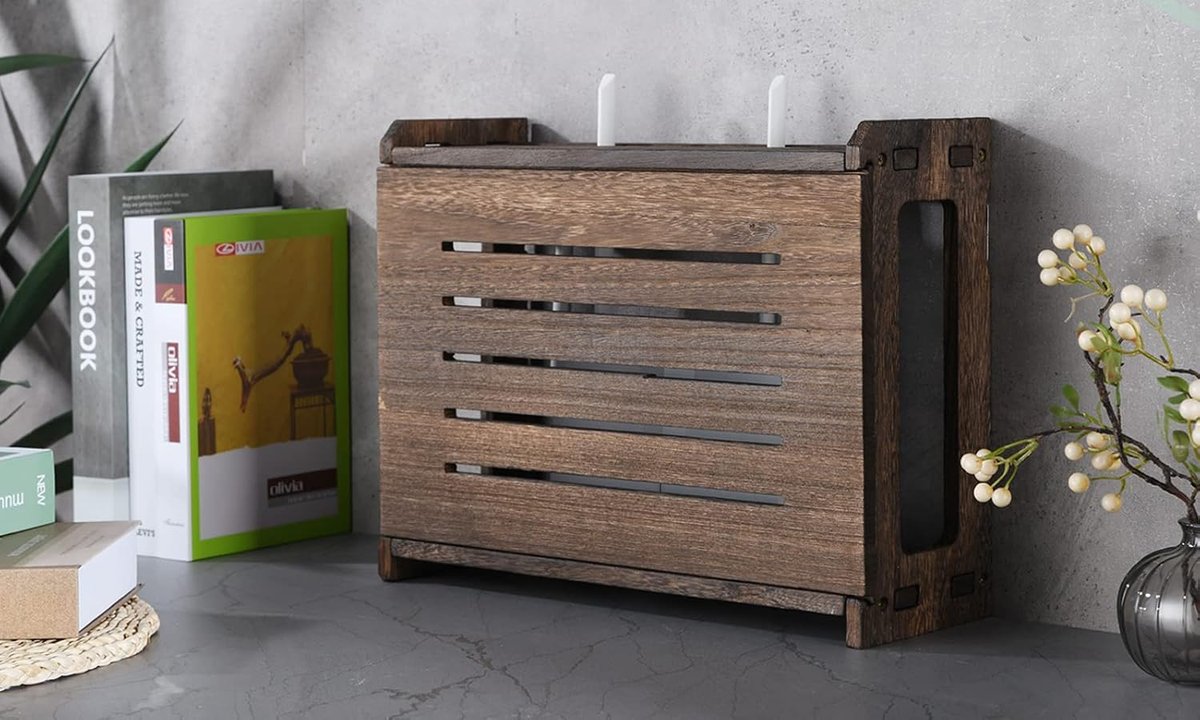
This is a small wooden box that screws onto the wall, so the router, modem and a power strip sit inside it instead of on a shelf. It is the pick when you have no shelf space or the router keeps ending up on the floor. I picked it because a closed wood box looks tidier than a tangle of cords hanging down the wall.
Main Features
- Look: A retro-style wood box with a slatted front, per the listing photos.
- Mount: Hangs on the wall. You assemble it with screws, per listing.
- Size: The listing says about 14.9 inches long, 9.8 inches tall and 5.4 inches deep inside, enough for a router, modem and power strip.
- Cable holes: Multiple routing holes let the cords run out toward the outlet, per listing.
- Material: Natural wood, per listing.
What Customers Like
- Amazon shows 4.4 out of 5 stars on the listing.
- Customers commonly appreciate the clean look and how easy it is to put together.
- Several buyers say it hides the modem and the cables, including power cords, on the wall.
- Some buyers say it feels sturdy and is good value for the money.
Things to Consider
- A few buyers say it is not very sturdy or not worth the price.
- Fit and closure get mixed feedback: some say larger routers fit easily, others say it does not fit well or will not stay closed.
- It needs assembly with screws and has to be fixed to the wall, so check your lease before drilling.
- Check your router’s width, depth and antennas against the listing’s inside size of about 14.9 x 9.8 x 5.4 inches before you order.
Best Suited For
- Walls near an outlet in a hall or home office
- Anyone with no shelf space for a router
- Routers that share a box with a power strip
3. FLANCCI LED Light Dimming Stickers (2 Sheets)

Sometimes the blinking is the real problem, not the box. These are sheets of small black peel-and-stick filters in lots of sizes. You stick one over a bright LED on the router or modem so the room is not lit up at night. It will not hide the box, but it is the one pick here that costs very little and needs no tools.
Main Features
- Sheets: Two sheets per pack, per listing.
- Dimming: The listing says each sticker dims the light by about 50 percent, up to 80 percent.
- Shapes: Round and rectangular pre-cut pieces in many sizes, and the sheet is about 4 by 8 inches in the listing’s diagram.
- Use: Peel and stick over a light on an alarm clock, a router or other devices, per listing.
- Setup: No tools and no drilling.
What Customers Like
- Amazon shows 4.2 out of 5 stars on the listing.
- Customers commonly appreciate that the stickers are easy to stick on and take the harsh edge off bright lights.
- Several buyers say it works well on red lights and on appliance or air conditioner displays.
- Some buyers mention they are good value for the price.
Things to Consider
- They dim, they do not black out. One buyer says if you want a light completely gone, this is not designed for that.
- A few buyers say blue or white lights still show through, so you may need to stack a second sticker.
- One buyer says the adhesive loses some stick if you peel it off and reposition it.
- It does nothing for how the boxes look, so pair it with a hiding option.
Best Suited For
- Bright lights that spill into a bedroom or open-plan living room
- Renters who cannot drill or build anything
- Anyone on a very small budget
How to Choose a Way to Hide Your Router and Modem
- Your gear’s size: Measure your router and modem width, depth and height, plus the antennas standing up. A cabinet that is too tight blocks airflow.
- Airflow and signal: Look for vents or open backs and keep the box away from metal. Run a speed test before and after, and move it if the signal drops.
- Where it goes: A TV stand or desk suits a cabinet. A wall near an outlet suits the wall box. A bedroom suits dimming stickers.
- Drilling or not: A freestanding box or a sticker needs no drilling. Anything wall mounted does, so check your lease.
- Budget: Start with the free fixes, then add stickers for lights, which cost the least. A cabinet or wall box costs more.
Final Verdict
If I could only choose one for my own TV stand, I would start with the vented wooden hider, because it tidies the boxes and the cords in one move. If my router had no shelf and lived on the floor, I would pick the wall box and check my router size first. If the real problem was the blinking at night, I would start with the stickers, since they cost the least.
If you are still stuck on how to hide router and modem in a living room with one outlet, I would start with the free fixes and add only one thing. I look at where the cords run and how much airflow the box needs, because a hidden router that gets hot is worse than a visible one.
Then I pick the option that fits the spot: a vented router hider for a shelf, a wall box where there is no shelf, or dimming stickers if the lights are the only problem. Learning how to hide router and modem does not have to be a big project, and I would rather spend one evening on it than watch blinking lights every night.
Check the size in each listing against your own router before you order.
I also keep one small habit going so the shelf stays calm after I figure out how to hide router and modem. I check that the vents are clear, wrap the cords with a tie and dust the box once a week. That takes a couple of minutes, and the room looks tidy without the blinking lights.
If you rent, I would also keep the original box handy, so a move or a provider swap does not turn into a cord hunt.
Wi-Fi bars can drop when a router sits inside a closed box, so I always leave a gap at the back and the sides. A cable behind the wall box should never be pinched or bent tight. If your signal gets weaker after the change, move the router one shelf up and test again before you blame the provider.
Any of the three can work alone, and the stickers pair well with the others. Before you buy, check the latest price, size options and return policy on Amazon, since prices and stock can change.
Frequently Asked Questions
Can you put a router in a cabinet?
You can, but a closed cabinet, especially a metal one, may weaken the signal. Pick a vented wood hider or an open back, keep air around it, and test your Wi-Fi after you move it.
How do I hide a router and modem without losing Wi-Fi?
Cover them with wood, fabric, books or a plant, not metal, and leave the top and back open. Keep the router in a central spot and off the floor when you can.
Where is the best place to put a router?
A central, higher spot in the room works well, away from metal and thick walls. In many homes the cable location decides where the modem has to sit.
Do router hider boxes block Wi-Fi?
A vented wood box usually blocks much less than a solid metal one, but any enclosure can cut the signal a bit. Test your speed before and after.
How do I stop router lights from keeping me up?
Use dimming stickers, a small piece of tape or move the box out of your line of sight. Dimming stickers reduce the light but may not block every color.
FREE HIDE YOUR ROUTER CHECKLIST
The Hide-Your-Router Checklist (PDF)
Measure your longest roll, pick the right container for each problem and set a small storage budget.
- Router and modem measuring sheet
- Free fixes plus the right container for each problem
- After the holidays checklist and budget
✨ Download Checklist
Instant digital download • 100% free • No spam ever